Captions for short-form video: where they go, how many words, what reads
Captions are the whole video for anyone watching with the sound off. Here is where to put them, how many words to show at a time, what makes them readable on a phone, and when you need a subtitle file as well.
The RapidCreate team6 min read


In this post 10 sections
Key takeaways
- Captions serve people who cannot turn the sound on and people who cannot hear it. The WHO counts about 430 million with disabling hearing loss.
- Burn captions into the picture for control over how they look; treat the platform’s automatic captions as a separate accessibility feature.
- Keep captions out of the bottom 672 px of a 1080 × 1920 video, or the platform’s own text will cover them.
- Show two to five words at a time, large, in a heavy weight, with one accent colour.
Do short videos need captions?
Yes, for two groups of people who would otherwise get nothing from them: those who can’t turn the sound on, and those who can’t hear it.
The first group is large. In a 2019 survey of US adults by Verizon Media and Publicis Media, 80% said they were more likely to watch a whole video when captions were available (Broadcasting+Cable, Mobile Videos Often Watched Without Audio, Study Finds, May 2019). The same survey is the source of the figure, quoted in a 2024 paper in PLOS ONE, that up to 69% of people prefer to watch video without sound in public places (Szarkowska et al., PLOS ONE, October 2024). It’s an old survey and it asked people what they do, which isn’t the same as measuring it. But it matches what anyone sees on a train.
The second group is permanent. The World Health Organization estimates that over 5% of the world’s population, about 430 million people, need rehabilitation for disabling hearing loss (WHO, Deafness and hearing loss, March 2026).
There’s a third reason, and it applies to everyone else. Words on screen give the eye something to follow. A caption that moves with the voice keeps a viewer’s attention on the video for one more second, and then one more.
Should you burn them in, or use the platform’s?
Burn them in, for anything you care about the look of. But it helps to know what each kind does.
The platform’s own captions are made by speech recognition after you upload. YouTube offers them (YouTube Help, Use automatic captioning), and so does TikTok (TikTok Newsroom, Introducing auto captions). The viewer can usually switch them on or off. You don’t choose where they sit or how they look, and you get them on that platform only.
Burned-in captions are part of the picture. You choose the font, the size, the colour and the position, and the video looks the same wherever it’s posted. Nobody can switch them off, which for a short video is the point.
The two aren’t rivals. Burned-in captions are design: they set the pace and the tone. The platform’s captions are an accessibility feature a viewer controls. If you burn yours in, check them for mistakes, because a wrong word in the picture can’t be corrected after posting.
Where should captions go?
In the middle band of the frame: above the platform’s caption block and clear of the buttons on the right. On a 1080 × 1920 video, that means keeping them out of the bottom 672 px if the video is going to TikTok, Reels and Shorts alike.
This is the mistake that costs the most. Captions set along the bottom edge, where film subtitles go, look right in an editor and end up underneath your own description once posted. Lift them to roughly a third of the way up the frame, or centre them.
Check with your own video:

Platform
Or drop a file on the phone. It is read in your browser and never uploaded.
| Edge | Pixels | Share of the frame |
|---|---|---|
| Top | 270 px | 14% |
| Bottom | 672 px | 35% |
| Left | 65 px | 6% |
| Right, beside the buttons | 65 px | 6% |
| Buttons start, from the top | 1080 px | 56% |
The full margins for each platform, and why they differ, are in the safe zones guide.
How many words should show at once?
Few. Two to five words at a time is a good working range for short video, on one or two lines.
Why so few? A full sentence across the frame has to be small to fit, and the viewer reads ahead of the voice, so the joke or the point arrives early. Short groups keep the eyes and the ears together.
Speed is rarely the problem. Speech runs at about two and a half words a second. TikTok’s guidance for on-screen text is 5 to 10 words a second (TikTok for Business, Creative best practices for performance ads, updated June 2025). Captions that follow the voice sit well inside that. What strains a viewer is a second piece of text, a headline or a list, on screen at the same moment.
Break the groups where a speaker would breathe. “The three mistakes / everyone makes / with cold emails” reads better than “The three mistakes everyone / makes with cold / emails”, though both are the same words.
What makes captions easy to read?
Contrast, size and restraint.
- Contrast. Footage changes under the words from shot to shot. White text with a dark outline or shadow, or text on a solid box, stays readable over all of it. Thin text straight onto footage doesn’t.
- Size. Bigger than feels natural on a monitor. The video will be watched on a phone, at arm’s length, often while walking.
- A heavy weight. Bold, wide letterforms hold up at small sizes and under compression. Light and condensed ones break up.
- One accent colour. Use it for the word that matters in each group. If every word is highlighted, none is.
- A steady position. Captions that jump around the frame make the viewer hunt for them.
Is word-by-word highlighting worth it?
Usually, yes. A caption that lights up each word as it’s spoken shows the viewer exactly where the voice is, and that keeps their eyes on the frame. It has become the familiar style on short-form video.
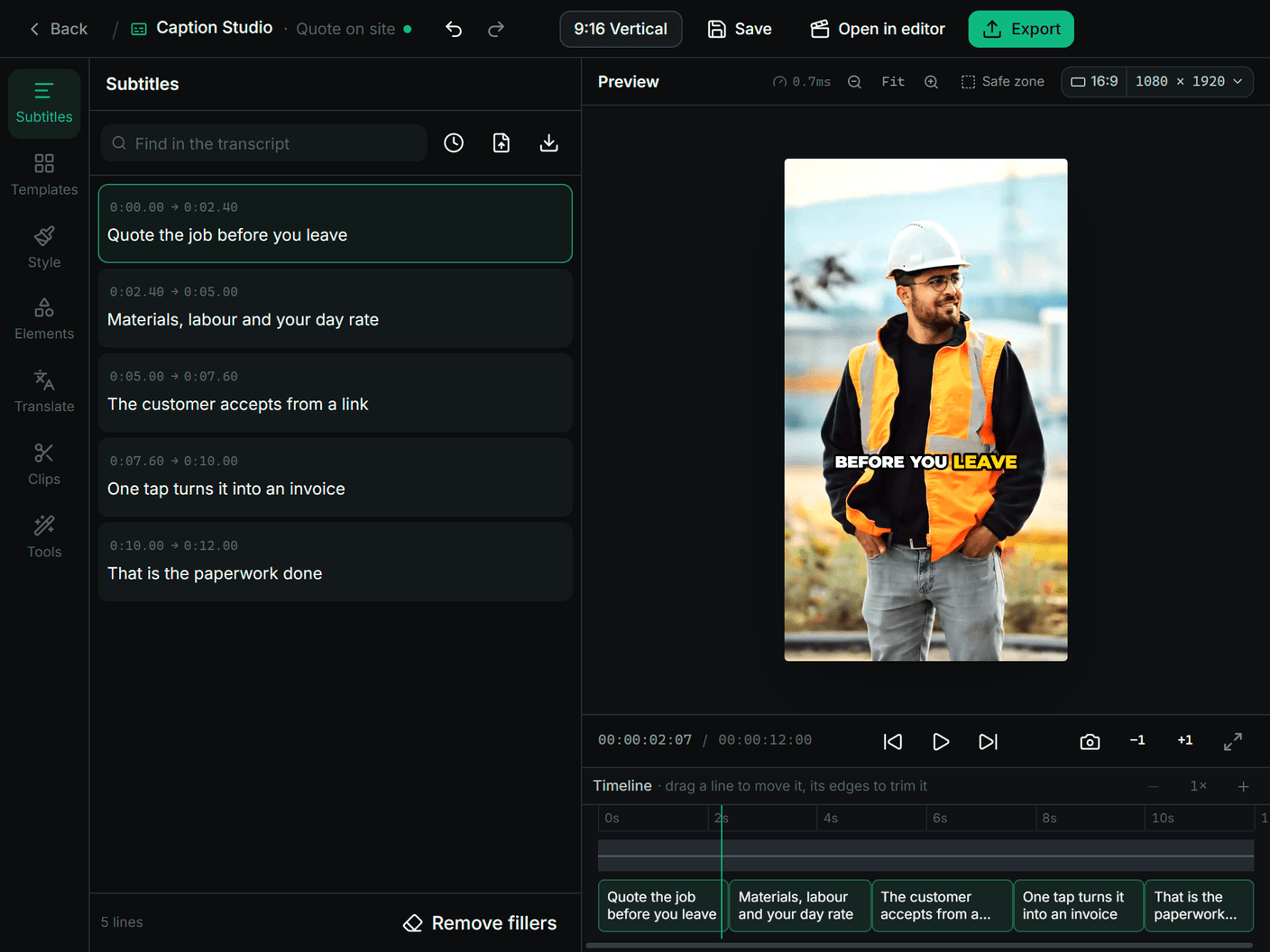
It does need accurate timing for every word, not only for each line. That’s why it has to come from a transcript of the audio itself. A plain subtitle file can’t supply it: an SRT file holds a start and an end for each line and nothing finer.
It also needs moderation. A highlight, a pop and a shake on every single word is exhausting by the tenth second. Pick one movement and keep it.
When do you need a subtitle file?
When the place you’re uploading to wants the words separately from the picture: a long YouTube video, a website player, a client who’ll translate them. Then you export an SRT or a VTT file as well as, or in place of, burned-in captions.
The two formats are nearly identical, and a player given the wrong one usually shows nothing at all. If you have one and need the other, the SRT to VTT converter and the VTT to SRT converter swap them in your browser, and the timing shifter moves every line when a file runs early or late.
Which mistakes come up most?
- Captions under the interface. Too low, or too far right.
- Uncorrected mistakes. Speech recognition gets names, brands and numbers wrong. Read every line once.
- A whole sentence at a time. Small, and it gives away the ending.
- Text over text. A headline and captions fighting for the same second.
- Too much movement. One effect, used the same way throughout.
Sources
- Broadcasting+Cable, Mobile Videos Often Watched Without Audio, Study Finds, 14 May 2019 (reporting the Verizon Media and Publicis Media survey), retrieved 12 October 2026: nexttv.com
- Szarkowska et al., PLOS ONE 19(10): e0306251, 7 October 2024, retrieved 12 October 2026: pmc.ncbi.nlm.nih.gov/articles/PMC11458047
- World Health Organization, Deafness and hearing loss (fact sheet), 3 March 2026, retrieved 12 October 2026: who.int
- YouTube Help, Use automatic captioning, retrieved 12 October 2026: support.google.com/youtube/answer/6373554
- TikTok Newsroom, Introducing auto captions, 6 April 2021, retrieved 12 October 2026: newsroom.tiktok.com
- TikTok for Business Help Center, Creative best practices for performance ads, updated June 2025, retrieved 12 October 2026: ads.tiktok.com/help/article/creative-best-practices
Questions
Do short videos need captions?
Yes. They carry the video for anyone watching with the sound off and for viewers who are deaf or hard of hearing, and words moving on screen help hold everyone else’s attention.
Where should captions go on a vertical video?
In the middle band of the frame, above the platform’s own caption and clear of the buttons on the right. On a 1080 × 1920 video for TikTok, Reels and Shorts, keep them above the bottom 672 px.
How many words should a caption show at once?
Two to five, on one or two lines. Short groups can be set large, and they keep the viewer reading in time with the voice.
What is the difference between open and closed captions?
Open captions are burned into the picture: everyone sees them and you control how they look. Closed captions are a separate track the viewer can switch on or off, such as a platform’s automatic captions or an SRT file.
Free tool: SRT to VTT Converter
What to read next
Making videos
How to make faceless videos, and stay inside the platforms’ rules
What a faceless video is, what YouTube, TikTok and Instagram say about originality and AI labels, and the seven steps to making one that feels like yours.
The RapidCreate team5 min read
Carousels and posts
How to make a carousel post: a slide-by-slide structure
What goes on each slide of a carousel, how many slides to make, how much text fits, and how to get the same post onto Instagram, LinkedIn and TikTok.
The RapidCreate team8 min read
Carousels and posts
Instagram carousel size: dimensions, ratios and the 20-slide limit
The size to make Instagram carousel slides (1080 × 1350), the taller 3:4 option, what Instagram’s help pages say about ratios and cropping, and the 20-slide limit.
The RapidCreate team4 min read